
Legacy documentation. This guide still works, but it relates to discontinued or superseded software. It is kept for anyone running an older setup and is no longer part of the current CloudWatcher documentation.
AAG WeatherCenter
AAG WeatherCenter is a free module which combines information from the CloudWatcher with information from a standard weather station controlled by either Virtual Weather Station, Weather Display or Cumulus software. For this program to be fully operational, one of those weather station packages must be installed.
WeatherCenter is no longer needed since 2017, because the CloudWatcher itself measures wind speed and relative humidity. It is fully operational but is not being updated—it is offered «as is».
The WeatherCenter manual and the download are available from the documentation hub and the downloads page.
Cumulus integration
Thanks to the effort of David Nicholls, reading weather information from the great and free Cumulus software is very easy for users of AAG WeatherCenter.
How it works
Once you have Cumulus working with your station, download the template file created by David, AAG_WeatherCenterCU.zip, and simply configure Cumulus template processing. Cumulus is the one that generates the file, from the template, and WeatherCenter simply reads it.
Step 1—Set the refresh interval
If you are not using the internet publishing capabilities of Cumulus, just set the refresh time in the Internet configuration window: setting autoupdate and the interval is enough.
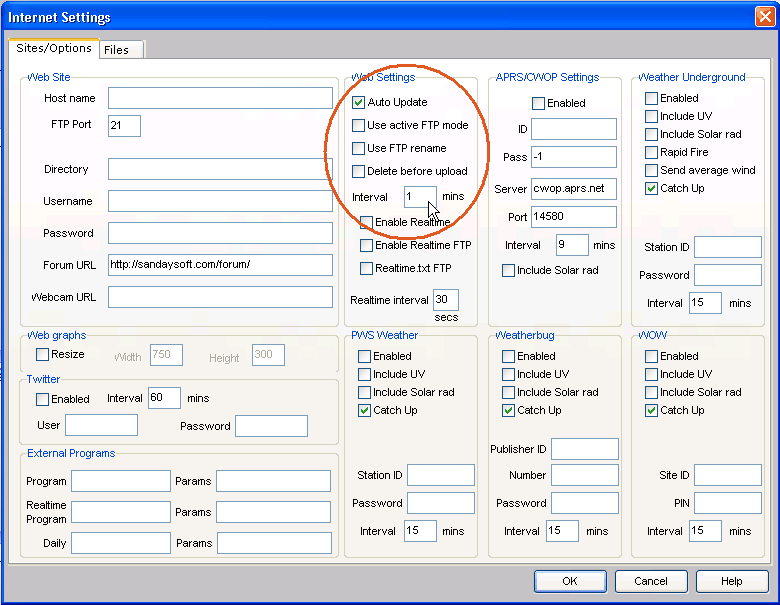
Step 2—Point Cumulus to the template
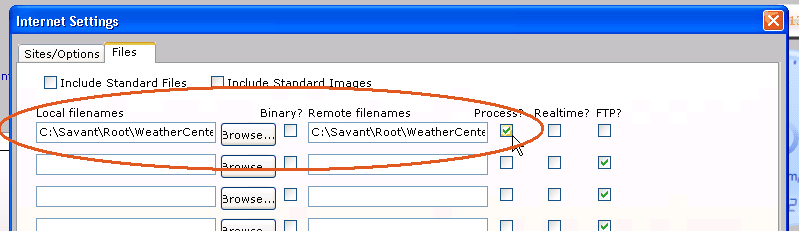
Then go to the «files» tab, and tell Cumulus where the template is and what file you want it to create. Don't forget to tick Process. The file at the left (local) is AAG_WeatherCenterCU.htm, the one at the right (remote) is ToWc.html.
Step 3—Point WeatherCenter to the generated file
This one (ToWc.html) is the one to be specified in WeatherCentre, Setup → Weather station → Data file. From now on, every «interval» minutes Cumulus will create the specified file, and AAG WeatherCenter will happily read it to complete its set of information.
A note on legacy status
Both WeatherCenter and this Cumulus integration were designed for an earlier era of the CloudWatcher. They remain functional, but are no longer needed for wind speed and relative humidity, which the CloudWatcher now measures itself.
Other ways to publish or reuse CloudWatcher data are the simple web server article and the Node-RED tutorial for the SOLO.