
The handpad input
All Seletek controllers (the original Seletek, Armadillo, Platypus, and Limpet) support the use of a simple handpad to control the main stepper focusing motor. At its core, the handpad is a 3-position switch—ideally of the "returning" type—wired via a DB-9 connector to the Seletek's EXP port (the only DB-9 connector on the Limpet).
To make it more versatile, you can add an optional 1K Ohm linear potentiometer to the design, which is responsible for setting the motor's speed. If the handpad is assembled without the potentiometer, the motor will simply run at full speed or not at all (zero).
Building the handpad
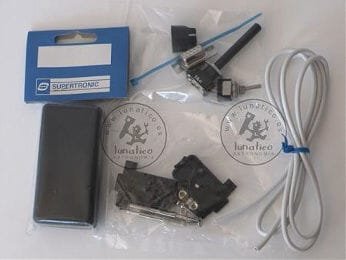
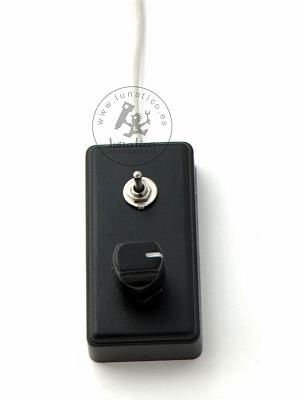
Items needed:
- A small box—almost any small prototype enclosure will do
- A 1K Ohm linear potentiometer (optional, for variable speed)
- A 3-position switch (ideally of the "returning" type)
- 4-wire cable
- A DB-9 plug (female for Seletek/Armadillo/Platypus—male for Armadillo2/Platypus2/Limpet)
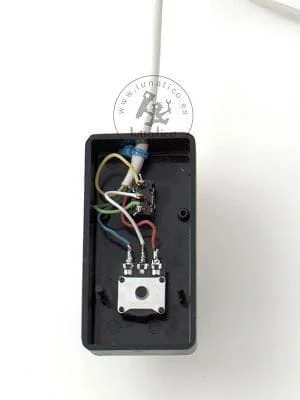
Wiring (pin numbers for the female DB9; pin numbers in italics are for the male DB9 used on Armadillo2/Platypus2/Limpet):
Potentiometer:
- Middle pin, to the switch's middle pin (white wire)
- Left (or right) pin to +12V—DB9 pin 1 (male pin 5) (red wire)
- Remaining pin to neutral—the DB9's chassis (blue wire)
3-position switch:
- Middle pin to the potentiometer's middle pin (white wire)
- One side to pin 6 of the DB9 (pin 9) (green wire)
- Other side to pin 7 of the DB9 (pin 8) (yellow wire)
DB9 summary, in addition to the connections already shown above:
- Chassis: neutral (blue wire)
- Pin 1 (pin 5): +12V (red wire)
- Pin 6 (pin 9): "in" (green wire)
- Pin 7 (pin 8): "out" (yellow wire)
With this small handpad connected to the Seletek's "EXP" connector (the only DB9 connector on the Limpet), you can operate the motor in a convenient and easy way—handy with a long cable, or when doing occasional visual observation.
Prefer not to build one? You can buy the handpad ready to use: Buy in Europe (EUR) · Buy Worldwide (USD).
Using the handpad
Without a potentiometer, the handpad is a simple on/off affair: full speed or zero, nothing in between. Add the potentiometer and it lets you dial in a variable speed for the motor instead.
The handpad works with or without a PC connected. However, it is the PC's Seletek software—not the Seletek hardware itself—that keeps track of the focuser's position. So if you don't want to lose position tracking (especially if you've performed a full calibration), keep the PC connected, with the Seletek software running, so that handpad movements are tracked too.
One last note: if the PC is connected and active, the speed of the motor is determined by the PC, not by the potentiometer—this adds even more versatility to the setup.
Keep the PC's software running: The handpad works whether or not a PC is connected. But position tracking is maintained by the PC program, not by the Seletek alone—so it's the PC that should stay connected, with the Seletek software running, if you don't want handpad movements to be lost from tracking, especially after a full calibration.