Can't find your Solo on the network? Follow these steps to access its shared data folder from Windows.
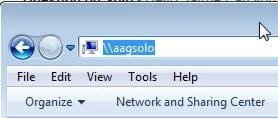
Open Windows File Explorer (Win+E) and type the following in the address bar:
\\aagsoloThis should locate the device and show the shared folder directly.
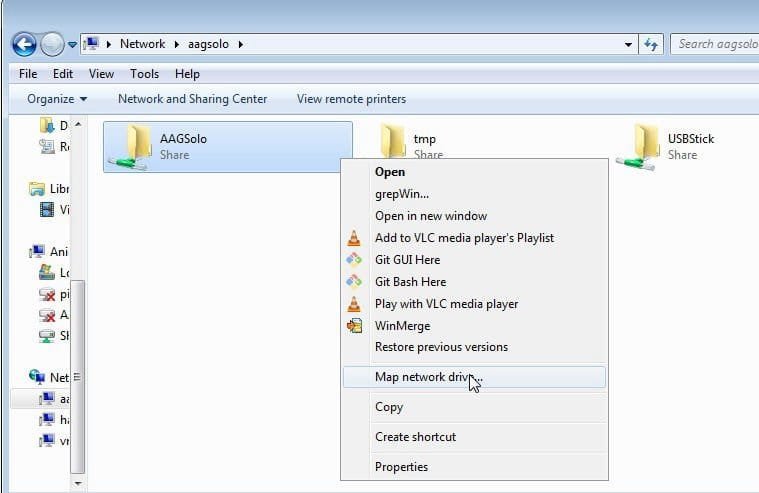
Once you see AAGSolo in the network, right-click on it and choose Map network drive. The folder to map is \\aagsolo\AAGSolo.
picloudwatcher
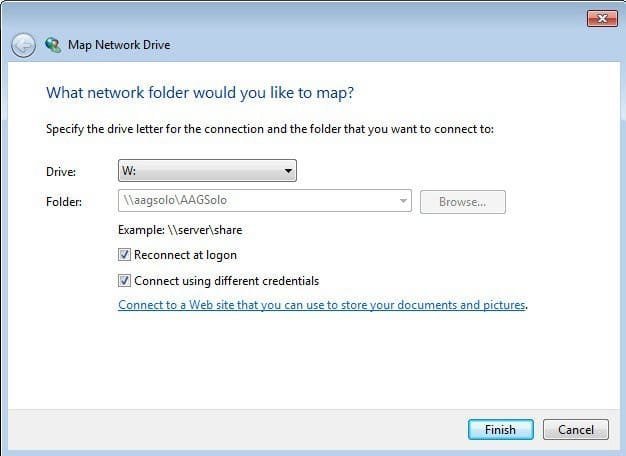
\\aagsolo\AAGSolo.Once mapped, the Solo's shared data folder appears at unit W: (or any other drive letter you choose). The CloudWatcher Windows software can then read the data from this path.
For remote access from outside your local network, see the Remote access guide (PDF) or the Zero Configuration Network page.
