
Out of the box, the Seletek / Armadillo ... controllers can drive motors up to 1A/phase. To overcome this limitation there are several approaches, the simplest one being using a standard «step and dir» (or «clock and dir», or «pulse and dir» ...) stepper driver. There are many models in the market, with Geckodrive in the U.S. and Nanotec in Europe being maybe the most popular.
These controllers take two inputs to command a motor:
- a clock signal (also called step, or pulse), one pulse per step of the motor
- a direction signal, indicating if the motor should move CW or CCW
Wiring
The Seletek controllers generate these signals at the following pins:
| Main | Exp | |
|---|---|---|
| Clock / Step / Pulse | 1 | 2 |
| Direction | 2 | 3 |
Important: the signal generated will be a 12V one (actually the same as the power supply), so check with your Step&Dir controller if it will accept this voltage, or if you need to step it down.
Ground is always found at the shell of the DB-9 connector, be it Main, EXP or Third.
If you need an «enable» signal, you can use:
- Classic Seletek, Armadillo & Platypus (first model): EXP and Third port's pin 1, which carries a fixed +12V (not available in MAIN port).
- Armadillo 2, Platypus 2, Tarsier & Limpet: Any port pin 5 (+12V).
Bear in mind: you need firmware 2.1 for this to work. To apply, download your firmware file (from the repository) and drop it over the Armadillo drawing. If you are still in some version older than 2.0, you'll have to upgrade to 2.0 first: follow this guide.
Software configuration
Configuring the software is easy...
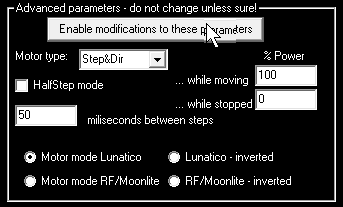
... please select «Step&Dir» as the motor mode, adjust the number of milliseconds between steps, and leave the rest of the parameters as shown in the image. You can now drive any stepper!