Important: these modifications require version 7.10.100 (or higher) of AAG_CloudWatcher, and version 2.30.100 (or higher) of AAG_WeatherCenter.
1. Configure ACP's weather server
Configure the weather server of ACP Observatory Control Software to use AAG_CloudWatcher. Please refer to the help of AAG_CloudWatcher, section "Working with other programs", subsection "Using with ACP".
2. Copy files
Copy files:
aAAG_WeatherControl0.aspaAAG_WeatherControl1.aspasystemstatus.aspaweather.asp
…to the sub-directory:
ACP Web Data\Doc Root\aclocated inc:\Documents and Settings\All Users\Documents\for ACP 6.0 under Windows XP; orACP Web Data\Doc Root\aclocated inLibraries\Documents\Public Documents\for ACP 6.0 under Windows 7.
It is strongly advisable to make a copy of the existing files before copying the modified files.
Notes:
- File
asystemstatus.asphas been modified to allow the description of the weather to be consistent with the descriptions defined in AAG_CloudWatcher / AAG_WeatherCenter; - File
aweather.asphas been modified to have its link pointing to AAG_WeatherControl.
These modifications were done on the original files from version 6.0 of ACP.
3. Create a new tiddler
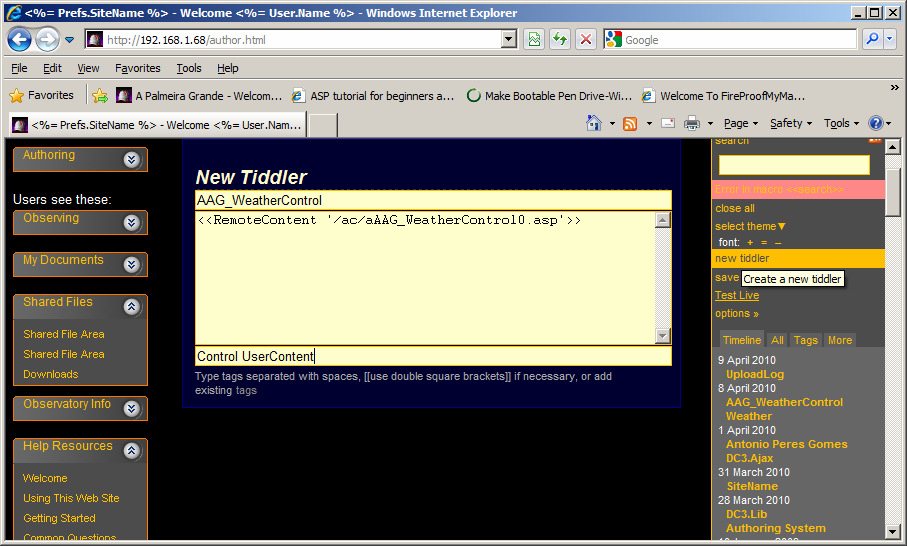
Go to authoring mode in the ACP browser and create a new tiddler and name it AAG_WeatherControl, with the following content:
<<RemoteContent '/ac/aAAG_WeatherControl0.asp'>>
…and define tags as:
Control UserContent
4. Save the tiddler
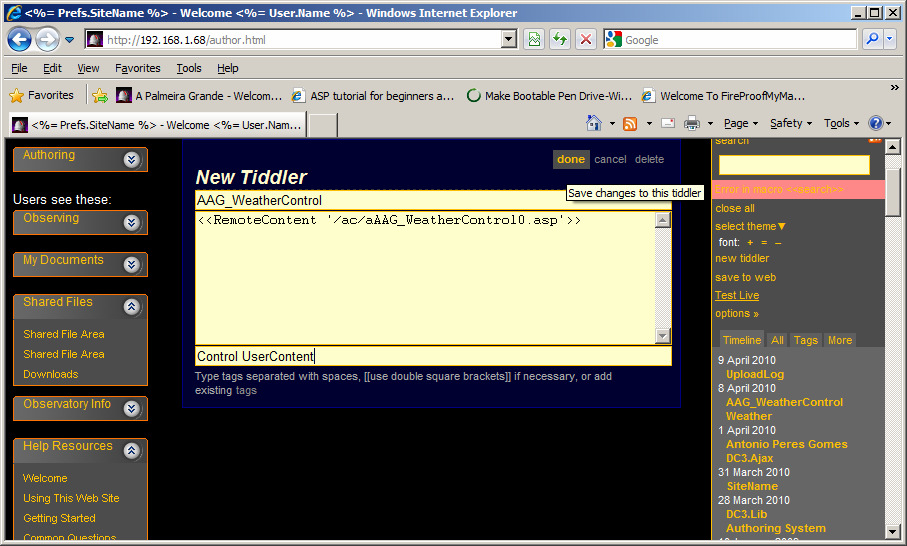
Save the tiddler by clicking on "done" and then "save to web".
5. Step by step
The next images highlight this procedure. First, the new tiddler, with its content and tags filled in:
Click "done" to save changes to the tiddler:
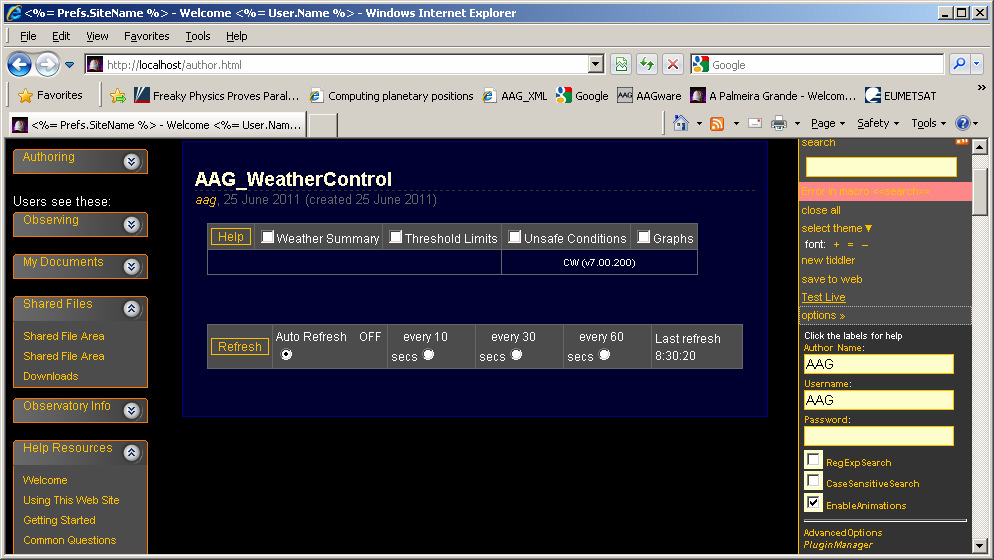
Then "save to web". Before doing so, define Author, Username and Password under options. This is the result once saved:
Modifications to the System Status tiddler
The modifications are shown below; they were done in file asystemstatus.asp of the sub-directory of ACP v6.0, in function getWeatherStatus.
Red represents the text that was introduced, blue is the original text, and green is the original text that was cancelled.
function getWeatherStatus()
{
  if(!Weather.Available)
     return "@inn/a";

  try {
     if(Weather.Precipitation)
        return("@wnRain");                           // Rain is always unsafe

  } catch(ex) { }
//----------------------- AAG modification new code
        var C;
        try {
                 C = new ActiveXObject("AAG_ACPWeatherFeed.Weather");
        } catch(ex) {
           C = null;
                         Response.Write("AAG_ACPWeatherFeed is not available.\n\n");
                         Response.End();
        }                                         // We have AAG_CloudWatcher and it's connected
        var ret = "";
        try {
                 ret = C.WeatherDescription()
        } catch(ex) {
           ret="Error - Incorrect version";
        }
//----------------------- AAG modification cancelled code
//
//      var clouds = null;                               // [sentinel]
//      var wind = null;                                 // [sentinel]
//      try {
//         clouds = Weather.Clouds;
//      } catch(ex) { }
//      try {
//         wind = Weather.WindVelocity;
//      } catch(ex) { }
//
//      var ret = "";
//      if(clouds !== null) {
//         if(clouds < 0.2)
//            ret += "Clear";
//         else
//            ret += "Clouds";
//      }
//      if(clouds !== null && wind !== null)
//         ret += " ";
//      if(wind !== null) {
//         if(wind < 8.0)
//            ret += "Calm";
//         else
//            ret += "Wind";
//      }
//----------------------- AAG modification END
      if(Weather.Safe) {
         if(ret === "") ret = "OK";
         ret = "@an" + ret;
      } else {
         if(ret === "") ret = "Unsafe";
         ret = "@wn" + ret;
      }

      return ret;
  }
Note that // at the beginning of the line turns the line into a remark. So the block of instructions starting at line:
// var clouds = null; // [sentinel]
//…..
…and up to:
//-----------------------AAG modification END
…is fully remarked, and consequently the respective instructions are disregarded.
These modifications ensure that the weather description displayed in the System Status tiddler of the ACP browser is consistent with the information from AAG_WeatherCenter / AAG_CloudWatcher.
Modifications to the Weather tiddler
The modifications are shown below; they are done in file aweather.asp of the sub-directory of ACP v6.0.
Red represents the text that was introduced, and green is the original text that was cancelled.
// ----------------------------------AAG modifications BEGIN
//        Response.Write("The items and values shown are those supported by the @@" + Weather.Name + "@@ sensor. " +
//                          "If you have a Boltwood Cloud Sensor II, see the [[CloudSensor II]] item for more info.\n");

          Response.Write("<html><p>The items and values shown are supplied by the " + Weather.Name + " weather server for AAG_CloudWatcher.</p></html>" +"Also see [[AAG_WeatherControl]] for more info.\n");
// ----------------------------------AAG modifications END
Contents of the ACP Web Data\Doc Root\ac directory
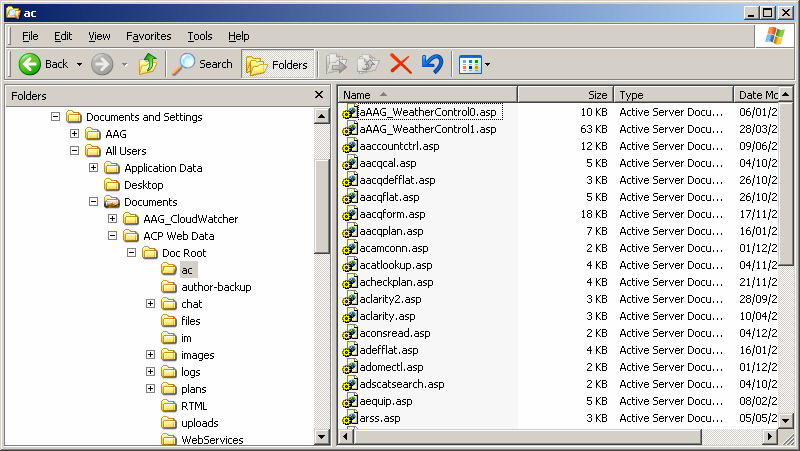
For reference, this is the "ac" directory for ACP 6.0 under Windows XP once the modified files have been copied in—note aAAG_WeatherControl0.asp and aAAG_WeatherControl1.asp at the top of the list: