Thousands of users put the control of their observatories in the hands of their CloudWatcher every day. After all, it is reliable. But even a reliable sensor can fail, and when our—preciously fragile, painfully expensive—observatory equipment is what is at stake, the safer we can be, the better.
A customer of ours (Kyle Goodwin) came up with the idea of using an RG-9 directly connected to the Dragonfly as a backup to the CloudWatcher’s rain sensor, to work as a failsafe should the CloudWatcher encounter an issue at any point.
This is a creative way to ensure a second layer of security for the observatory!
Note: please let us know if you think we should make a safety monitor driver for the Dragonfly.
Setting it up
Setting this system up yourself is easy as, let’s take a look at the steps to follow. You will need:
- Your Dragonfly
- Your RG-9
- A screwdriver to unscrew the lid of the RG-9, and one to screw in the screw-on terminals
- A 4.7kΩ resistor (other values may work as well)
Once you’ve gathered those, just follow the process outlined below.
- Step 1: open the Hydreon RG-9 (unscrew the four screws on its base).
- Step 2: connect three wires, one to each of the screw-on terminals (in the J1 connector), making sure to have them pass through the cable gland. Screw in the GND wire, but not the other two just yet!
- Step 3: connect your resistor between the OUT and V+ pins.
- Step 4: screw them in, making sure there is good contact between the resistor, the cable, and their slot (try pulling to ensure they’re sufficiently tight). Taking a picture of the colour you have chosen for each pin may be useful now.
- Step 5: close your RG-9, make sure you remember to make sure the cable gland and the screws are tightly screwed in. Also, don’t forget to place the silica gel bag back where it was.
- Step 6: connect the end of the wires to Dragonfly terminals, such that the OUT goes to IN, V+ goes to 5V, and GND goes to ground.
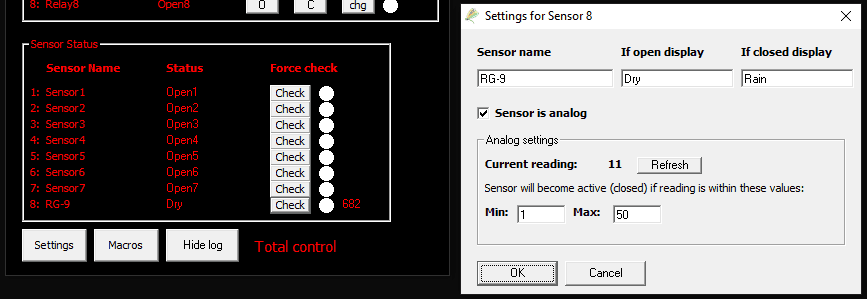
- Step 7: set up the sensor in the Dragonfly application. For a 4.7kΩ resistor, the settings in the following image work well.
- Step 8: there’s no step 8, you’re all set, enjoy having an extra safe setup!