
The CaterpillarR is the Caterpillar model that works with relays (hence the R). It is designed to retrofit existing observatories with manual operation. For observatory domes designed to be operated by four buttons—to open the shutter, close it, rotate clockwise, and rotate counter-clockwise—the CaterpillarR automates these functions via four relays, wired in parallel with the buttons on the control unit.
Connect your computer to the CaterpillarR with a USB cable and turn it on. Windows will detect a new device and may install the drivers automatically. You will also need to install the CP210x driver and disable the USB power saving feature (see the Connecting via USB section for details).
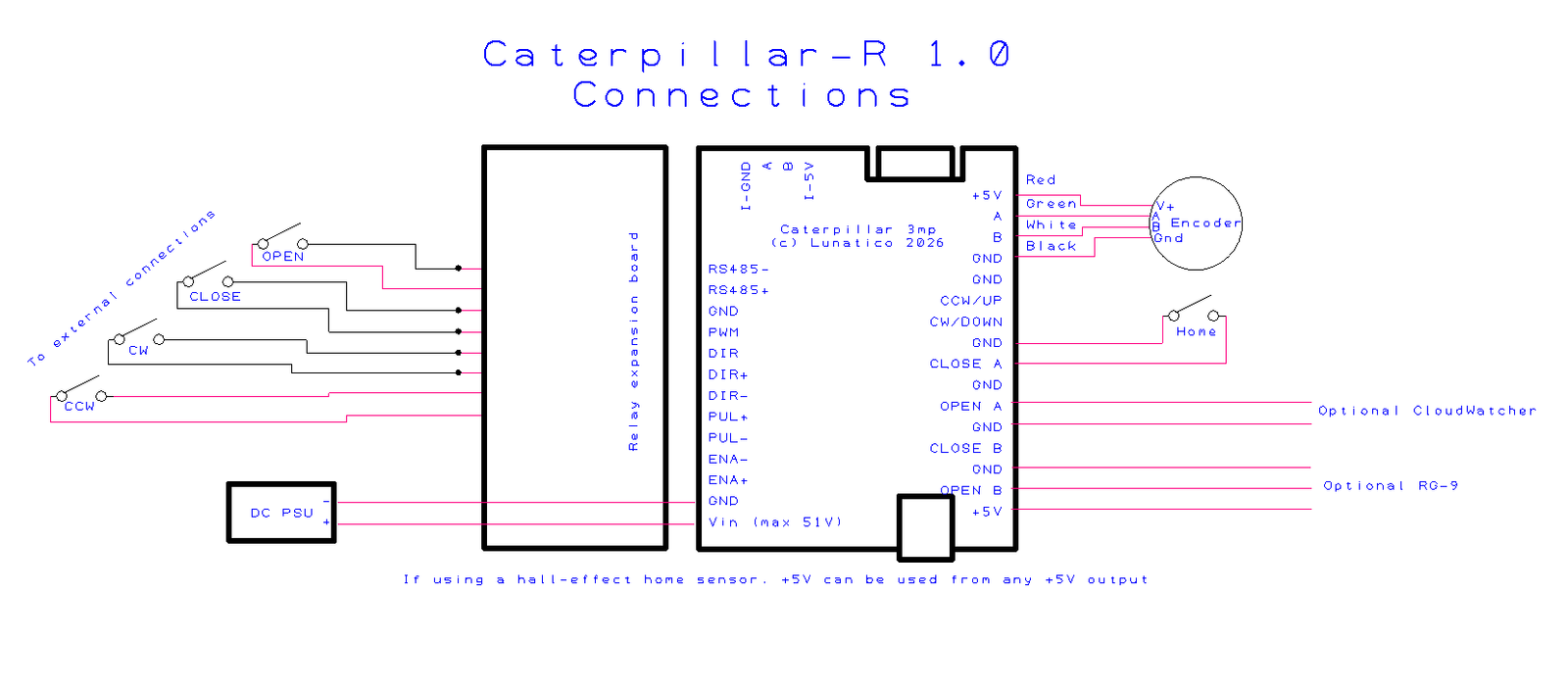
What you'll need
| Existing motor system | With accessible CW, CCW (and optionally Open, Close) button contacts |
| USB cable | To connect the board to the PC running your ASCOM software |
| Encoder | For precise azimuth positioning |
| Home sensor | For azimuth reference after power cycle |