
One of the most important actions
Parking the mount is one of the most important actions we may want to execute in case of unsafe weather, before closing the roof, etc.
If you're using automation software like ACP, Voyager, or N.I.N.A., this sequencing is typically handled for you. But if you want a lightweight, standalone solution triggered directly from a CloudWatcher or Dragonfly script, the approach below works with any ASCOM-compatible mount.
Parking via ASCOM script
This is extremely easy from a script—be it one of the Dragonfly scripts, or the CloudWatcher ones. This code below:
dim Tel
set Tel = CreateObject( "POTH.Telescope" )
Tel.Connected = True
Tel.Park
wscript.sleep( 20000 )
Tel.Connected = False
set Tel = nothing
… will connect to the "POTH" telescope driver, command it to park the scope, wait 20 seconds (20000 milliseconds), and then close the connection before releasing the object.
Finding the right ASCOM name for your telescope
To find out what's the correct ASCOM name for your telescope, execute the ASCOM profile explorer (under tools), and check the telescope drivers:
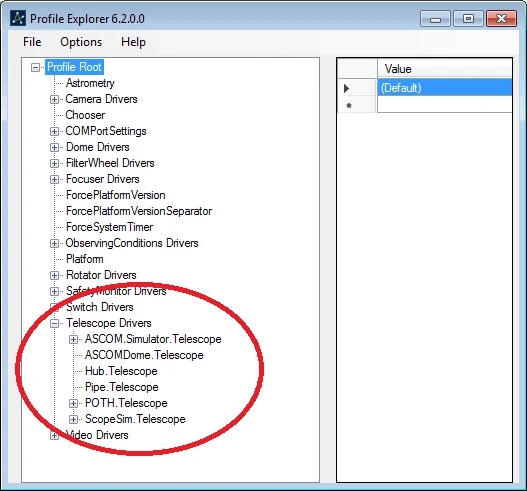
For sure you'll identify which one you're using. Just replace that name, complete (as in ASCOM.Simulator.Telescope) in the CreateObject command, and you're set.
Using this with a full automation platform
If you're using ACP Observatory Control, Voyager, or N.I.N.A. with the safety monitor, park-on-unsafe is typically a built-in option and the above script is not needed. The script is most useful for:
- Standalone roll-off-roof setups where no full automation platform is running
- As a backup park action in a Dragonfly safety script
- Simple setups where the scope is the only thing that needs to react to weather