
The hardware
Each Seletek, Armadillo or Platypus has two DB9 connectors:
- MAIN port: power outputs on pins 1–4.
- EXP port: power outputs on pins 2–5.
- Both ports carry ground at the shell.
These pins normally command stepper motors for focusing or filter wheels, but the PinByPin utility program lets you drive them instead as simple on/off outputs for fans and relays, either by hand or automatically from a temperature reading.
Wiring example
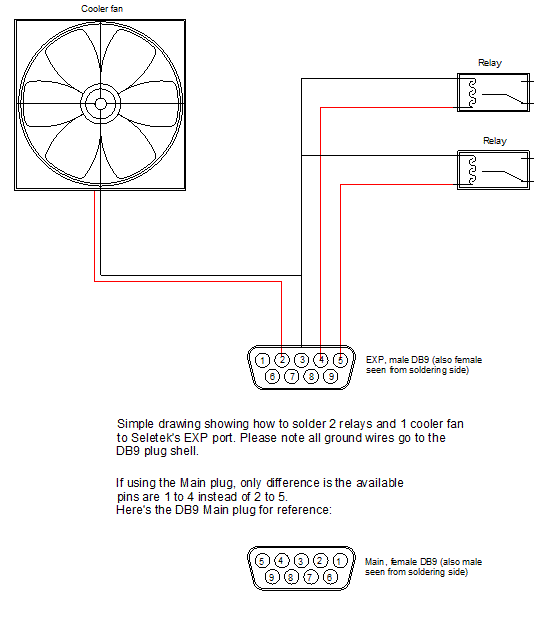
A typical EXP-port setup:
- Pin 2—cooling fan power.
- Pin 4—first relay (e.g. a dew heater band).
- Pin 5—second relay (e.g. a second dew heater band).
- Shell—common ground for all three devices.
So it takes just a few wires and a DB9 connector—on the earlier controllers, a female plug to mate the EXP port and a male one for the MAIN port. With PinByPin you can then control, remotely or automatically from a delta-temperature reading, whether your main mirror is being cooled or the corrector lens protected against dew.
Update: on Armadillo2 and Platypus2 controllers, all ports use female DB9 sockets with pins 1–4 active—the same configuration as the MAIN port on earlier models.
Software control with PinByPin
PinByPin names each pin (e.g. "Fan" or "Dew heater 1") and lets you switch it manually or drive it automatically from a temperature-sensor reading—see the PinByPin overview for the full interface and worked examples.