
Why wire it in hardware
Most observatory automation systems close the roof via software: the weather sensor triggers a signal, the automation software reacts, and a command goes to the roof controller. This chain works well, but it has a weak point: if the automation PC crashes or freezes, the software cannot react. See also CW as a watchdog, which makes the same argument for the computer itself.
Close the roof, but never open it
Many motor systems include a push button to open or close the roof. They typically require the button to be pushed for a short period of time, and that will trigger the roof to open if closed, or close if opened.
One safe way to have the CloudWatcher relay close the roof (but never open it) is explained below. Apart from the CW itself, you just need a «roof opened» limit switch—that is, a switch that will be closed, active, when the roof is open—such as one of these:
- Rugged mechanical limit switch (Omron)
- Distance sensor
- Proximity sensor/limit switch
- Mechanical limit switch
- USB Switch
The wiring
The roof motor push button is connected, in series, to the limit switch and the CloudWatcher relay.
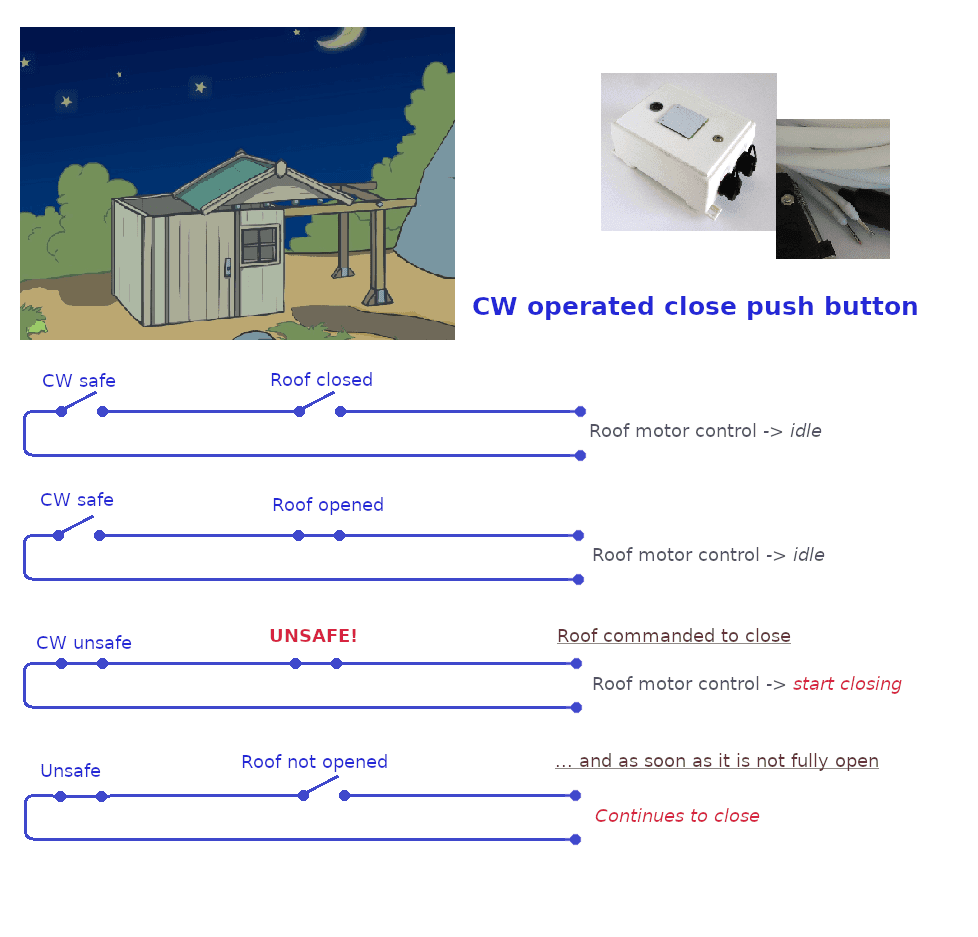
Please test your motor first
A few motors will not start moving until the button is released; for those this system will not work. So far we've found they are a minority.
Combined hardware + software approach
The relay-based approach works best as a hardware safety layer underneath a software automation system. Your automation software handles normal sequencing (park mount → close roof), while the relay provides a fallback that works regardless of PC state. Both approaches complement each other and neither prevents the other from working.