The FeatherTouch motor
FeatherTouch motorised focusers come with a small bipolar stepper motor and a multi-pin connector. The motor is well-suited to the Seletek's internal driver — smooth, precise, and low-current. The main thing to get right is the wiring order, since plugging a bipolar stepper in with the coil pairs swapped will cause erratic or no movement.
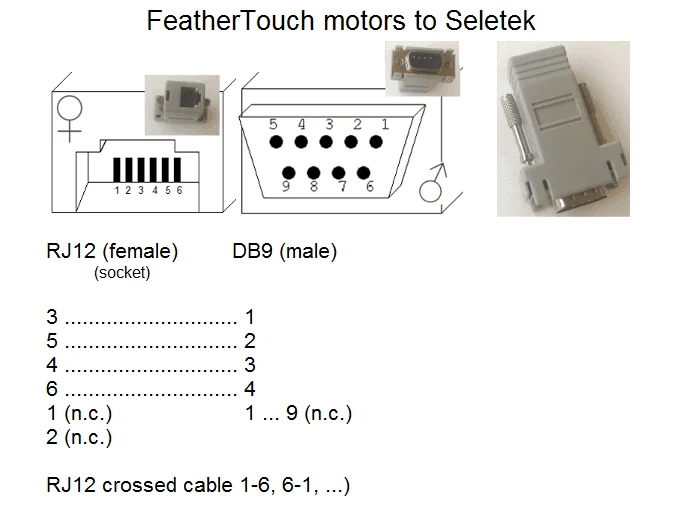
Wiring diagram
The FeatherTouch motor cable has four conductors corresponding to two coil pairs (A and B). Connect them to the Seletek motor input as shown in the diagram. Typical wire colours for the FT motor:
- Coil A: Red and Green (or Yellow) — connect to Seletek A+ and A−
- Coil B: Black and Blue (or White) — connect to Seletek B+ and B−
If your motor uses different colours, use a multimeter in continuity mode: wires that belong to the same coil will show a resistance of a few ohms between them. Wires from different coils will show infinite resistance.
Motor moves the wrong way? If the focuser moves in the opposite direction to what you expect, swap either coil A or coil B (both wires of one pair) — not just one wire.
Software configuration
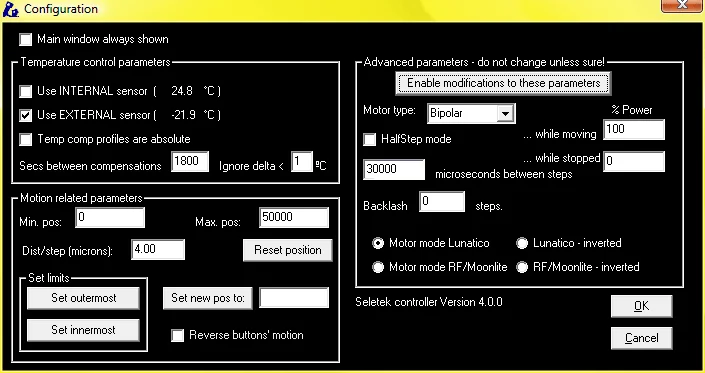
In the Seletek software, select the motor port and set the motor type to Bipolar stepper. Recommended starting settings for the FeatherTouch motor:
- Current: 400–600 mA (check your specific FT motor's datasheet if available — most small FT motors are in this range).
- Microstepping: 1/8 or 1/16 — finer microsteps give smoother motion.
- Max speed: Start at 500 steps/s and increase until motion is smooth and stable.
- Acceleration: 100–200 steps/s² avoids jerking at start and stop.