Why back up the settings?
Setting up the Seletek for a specific focuser — getting the speed, current, microstepping, backlash and temperature compensation exactly right — takes time. That configuration lives in the Windows registry under the Seletek software's key. A fresh Windows installation or a software uninstall/reinstall erases those keys, sending you back to defaults.
Exporting the registry key takes thirty seconds and gives you a .reg file you can store alongside your other observatory backups. Restoring it is just a double-click.
Exporting the settings
- Press Win + R, type
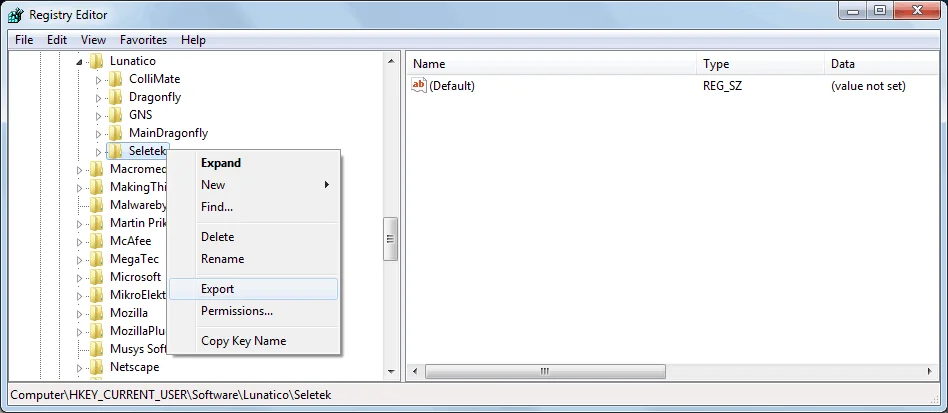
regeditand press Enter. - In Registry Editor, navigate to:
HKEY_CURRENT_USER\Software\Lunatico Astronomia\Seletek - Right-click the Seletek key and choose Export…
- Choose a destination folder and file name (e.g.,
seletek-backup-2024.reg) and click Save.
The exported .reg file is a plain text file containing all your settings. Store it somewhere safe — a network drive, cloud folder, or USB stick.
Restoring the settings
To restore on the same or a new PC:
- Install the Seletek software if not already installed.
- Double-click the .reg file. Windows will ask for confirmation — click Yes.
- Launch the Seletek software — all settings are restored.
After a major software update: New versions sometimes add new registry keys with default values. After restoring a backup from an older version, check the configuration panel for any new settings that may have defaulted to zero or an unexpected value.