
The parking script
The code below will connect to the «POTH» telescope driver, command it to park the scope, and then wait 20 seconds (20 000 milliseconds). You can call it from one of the Dragonfly scripts, or from the CloudWatcher ones.
dim Tel
set Tel = CreateObject( "POTH.Telescope" )
Tel.Connected = True
Tel.Park
wscript.sleep( 20000 )
set Tel = nothing
The wscript.sleep(20000) call pauses for 20 000 milliseconds (20 seconds) before releasing the ASCOM object, long enough for most mounts to reach the park position. Adjust this value to suit your mount's slew speed.
This script uses the POTH (Plain Old Telescope Hub) driver, which is the recommended way to share an ASCOM telescope with multiple applications. If you use a single-client driver directly, replace "POTH.Telescope" with your driver's ASCOM ProgID.
Finding your driver name
To find out what's the correct ASCOM name for your telescope, execute the ASCOM Profile Explorer (under tools), and check the telescope drivers.
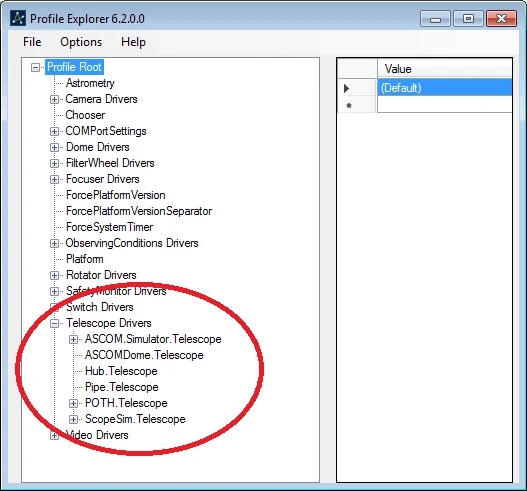
… for sure you'll identify which one you're using. Just replace that name, complete (as in ASCOM.Simulator.Telescope) in the CreateObject command, and you're set:
set Tel = CreateObject( "ASCOM.Simulator.Telescope" )
Tip: Save the script as a .vbs file and test it manually before wiring it into an automated sequence. You can run it by double-clicking it in Windows Explorer while your mount is connected and powered.