
The Initial motor configuration and settings application is a small Windows application used to fine-tune the Caterpillar's settings. You will use it to:
- Select the correct motor preset for your drive system
- Set physical and logical speed parameters
- Configure the WiFi so the board can be reached over your observatory network
- Run motor and encoder calibration
- Save all settings to the board's internal flash storage
Once your observatory is up and running, you will rarely need this tool again; day-to-day operation goes through your ASCOM or INDI driver and automation software.
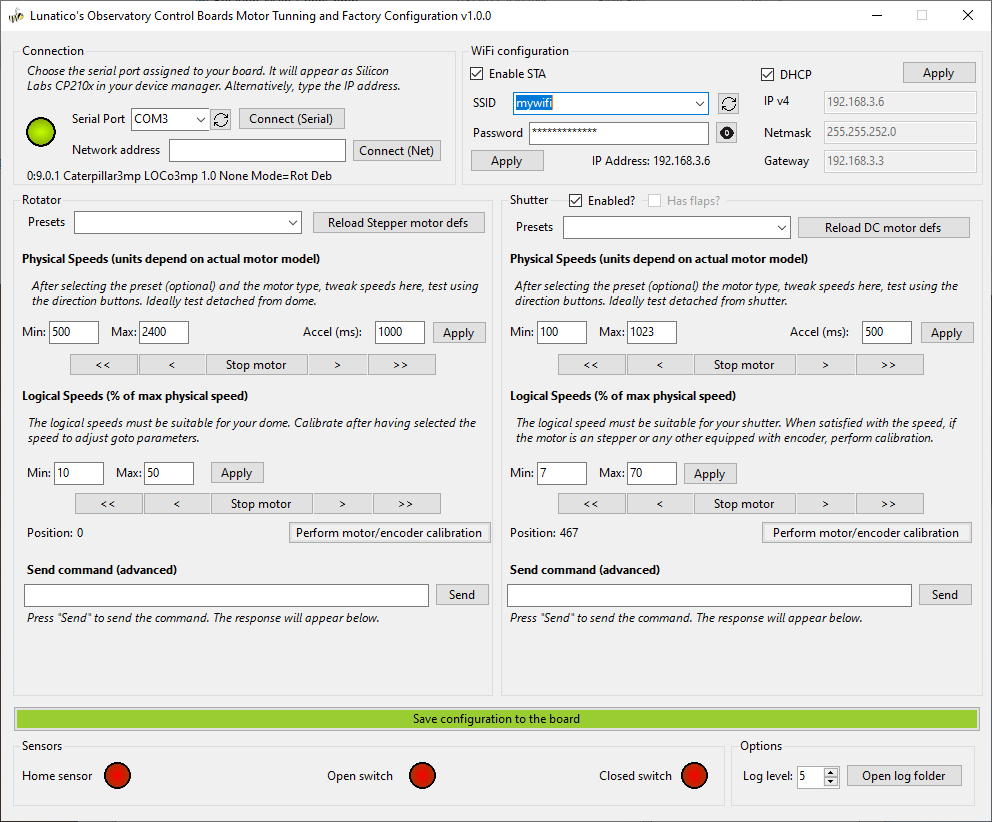
The window is split into two mirrored halves, Rotator (left) and Shutter (right). The shutter half only becomes active once you check its Enabled? box. Both halves share the same layout:
- A preset dropdown and a "Reload … motor defs" button. See Selecting a motor preset.
- Physical Speeds and Logical Speeds, each with jog buttons (
<<<Stop motor>>>) to test movement directly from the app. See Configuring speeds. - A live Position readout and a Perform motor/encoder calibration button. See Motor and encoder calibration.
- A Send command (advanced) box to send raw commands straight to the board. This is only needed for low-level diagnostics or support requests.
At the bottom, Sensors shows live indicators for the home sensor and, on the shutter side, the open/closed limit switches. This is handy for checking wiring without leaving the app. The green Save configuration to the board bar writes everything to flash (see Saving settings to the board). Options lets you raise the log level and open the log folder if you need to troubleshoot or file a support request.