
As received from the factory, the network settings will work in almost any case. Both the program and the Dragonfly are configured to take an automatic network address and work with it.
Either way, go ahead and press "configuration" from the window you minimized long ago and is now waiting in the lower left of the screen; you'll see these options:
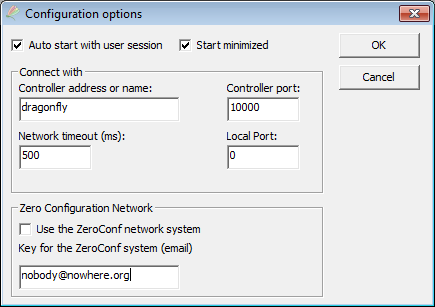
Basically:
- Auto start with user session: check this option if you want the software to be launched (and connected to the Dragonfly) as soon as your Windows session is started.
- Start minimized: this will simply collapse this program to the notification area, just as we did before, so it will not occupy space on your screen.
- Controller address or name: just as any computer in your observatory network, the Dragonfly has a name and an address. By default, its name is "Dragonfly" and its address will be assigned automatically. More on this later.
- Controller port: unless there's a problem, this should not be changed. You can think of ports as "channels" within the computer or controller—so the controller will be listening at channel (port) 10000.
- Local port: conversely, the port used by the computer. Leave it at 0 and a suitable one will be picked. You can force a specific value for special cases.
- Network timeout (ms): the same idea applies here—this is the time the program will wait for a network response before assuming there's a problem.
- Zero Configuration Network: if you are using this software from a different network than the one the Dragonfly is sitting on, you can connect to our cloud server to, in turn, establish the connection to the Dragonfly.
- Recommended for laptop users on the move, or from the smartphone.
- If the PC is sitting on the same network as the Dragonfly, do not use it—a normal, non-ZeroConf connection will be faster.
If you do choose to use ZeroConf, please note:
- The Dragonfly has to have been configured to connect itself (from the Configurator).
- Use your real email to avoid duplicities and help with system maintenance.
You have more information on it in Section 8, Zero Configuration Network.